
What you see
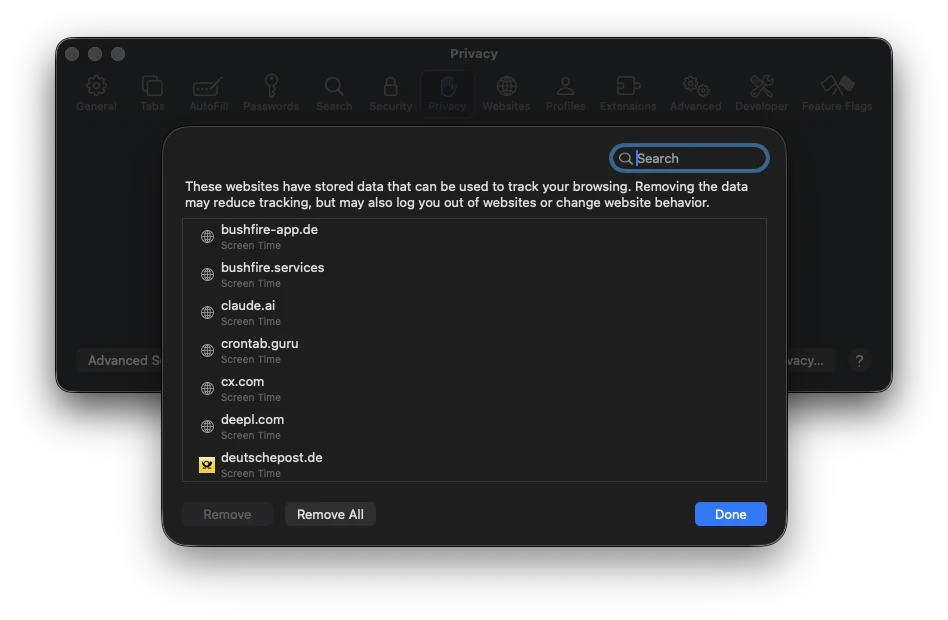
In Safari, open Safari › Settings › Privacy › Manage Website Data …. For some websites, the label Screen Time appears under the name instead of a data size.
How Bushfire behaves
Bushfire does not delete these entries. We tested this: after quitting Safari they are still in the list. The other website data that Bushfire deletes is not affected.
Remove in Safari
- Open Safari and choose Safari › Settings › Privacy.
- Click Manage Website Data ….
- Select individual entries and click Remove – or choose Remove All.
Safari removes these entries. They return as soon as you visit the website again. This is also the case when App & Website Activity is not active in Screen Time in System Settings.
Why Bushfire does not reach them
The entries are the WebKit data type WKWebsiteDataTypeScreenTime. They are not stored in Safari’s folders; WebKit fetches them from the system. That is why Bushfire does not reach them when it deletes files.
According to Apple’s Screen Time security documentation, the corresponding usage data is removed when users clear their Safari history. Safari does this itself. Bushfire deletes the history files directly and therefore does not trigger this removal.
macOS rejected the route through the system in our test: deleting web usage data is only allowed for registered web browsers. Bushfire therefore cannot delete these entries at the moment.
More on deleting by hand is in the guide Delete Safari history automatically.