Bushfire isn’t deleting? Here’s the fix.
The most common stumbling blocks – from first launch to deleting – and where to get more help.
macOS blocks Bushfire on first launch
If you downloaded Bushfire directly as a ZIP or DMG from GitHub or bushfire-app.de, macOS stops the app the first time you open it and says it could not be verified. That’s normal for apps that don’t come from the App Store.
Up to macOS 14 Sonoma, right-clicking the app and choosing “Open” was enough. Since macOS 15 Sequoia this no longer works – you now approve the app in System Settings.
You only need to do this once. After that, Bushfire opens normally with a double-click.
- Double-click Bushfire. When the warning appears, click “Done” or “Cancel” – not “Move to Trash”.
- Open Apple menu › System Settings › Privacy & Security.
- Scroll down to the “Security” section. You’ll see a note that “Bushfire” was blocked.
- Click “Open Anyway” and confirm with your admin password or Touch ID.
- In the next prompt, click “Open”. Done.
The “Open Anyway” button is only shown for about an hour after the launch attempt. If it’s missing, just try opening Bushfire again. More on this from Apple.
No permission for the Library folder
Since macOS Mojave, apps may no longer access data in the user’s Library folder without permission. For Bushfire to delete Safari data, you have to authorise the app explicitly – the video shows you how.
If you have already deactivated System Integrity Protection, you don’t need this setting.
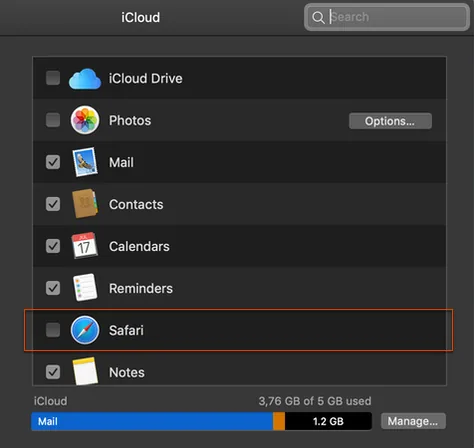
Is Safari connected to your iCloud?
If Safari syncs with iCloud, Bushfire cannot delete any Safari data – it is restored right away.
Fix: turn off Safari sync under System Settings › Apple ID › iCloud.